
PDF Software Alternatives to Adobe Acrobat
Nearly every industry today manages digital documents using PDF tools, which provide the most effective way to create and edit them. One of the most common among them is Adobe...

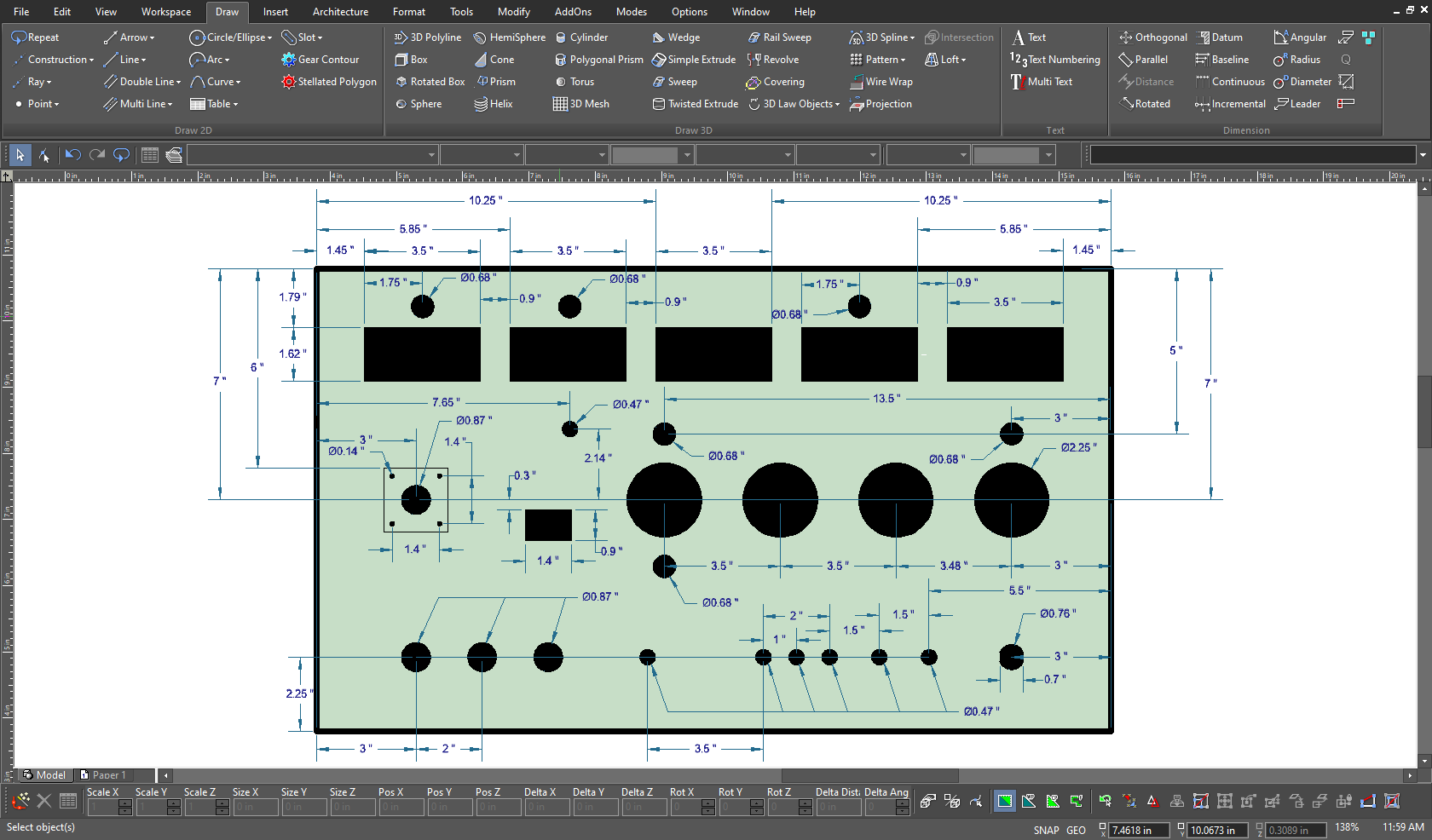
TurboCAD® Designer offers a comprehensive set of line, arc, curve, and spline tools, ensuring you have the right tool for every drafting task.
Achieve precise measurements with Smart Dimension tools, including parallel, orthogonal, rotated, and Auto Dimension options, allowing dimensions to be displayed in imperial or metric units for maximum flexibility.
Work with multiple independent layers that function like traditional drafting overlays but with smarter digital capabilities, allowing for efficient organization and control.
Personalize your workspace by adjusting toolbars, pop-ups, palettes, and command settings, optimizing your workflow and saving valuable time.
Refine and visualize your projects with handle-based editing, simplifying adjustments by simply holding and dragging for quick modifications.
Price: $99.99


Choose Version
| Feature | Designer | Deluxe | Professional | Platinum |
| AutoCAD® like 2D Drafting | ✔️ | ✔️ | ✔️ | ✔️ |
| Undo Manager | ✔️ | ✔️ | ✔️ | ✔️ |
| Dark Theme/4K Support | ✔️ | ✔️ | ✔️ | ✔️ |
| Ribbon UI Customization | ✔️ | ✔️ | ✔️ | ✔️ |
| Audit System | ✔️ | ✔️ | ✔️ | ✔️ |
| NEW: Newly designed launcher and start screen with workspace selection | ✔️ | ✔️ | ✔️ | ✔️ |
| NEW: Find Command in Ribbon UI | ✔️ | ✔️ | ✔️ | ✔️ |
| Copilot Help (free 1-Year-Subscription) | ✔️ | ✔️ | ✔️ | ✔️ |
| Copilot Professional | Optional | Optional | Optional | Optional |
| Progress Meter for Interop Filters | ✔️ | |||
| Command Line with Dynamic Input LTE Workspace) | ✔️ | ✔️ | ||
| Purge Tool | ✔️ | |||
| Layer Filters | ✔️ | ✔️ | ✔️ | |
| Design Director | ✔️ | ✔️ | ✔️ | |
| 2D Drawing, Editing, and Modifying | ✔️ | ✔️ | ✔️ | ✔️ |
| Bezier Curves | ✔️ | ✔️ | ✔️ | ✔️ |
| Smart Dimension Tools | ✔️ | ✔️ | ✔️ | ✔️ |
| PDF Underlay | ✔️ | ✔️ | ||
| Advanced Drawing Tools (Gear, Surface Tolerance, Text along Curve) | ✔️ | |||
| Best Fit Circle/Line | ✔️ | ✔️ | ✔️ | |
| Auto Numbering Feature | ✔️ | ✔️ | ✔️ | ✔️ |
| Associative Arrays and Pattern Tools | ✔️ | ✔️ | ||
| 3D Surface Primitives, Booleans, Helix | ✔️ | ✔️ | ✔️ | |
| 3D Splines and Polylines | ✔️ | ✔️ | ✔️ | |
| Extrude, Sweep, Revolve Generate 3D objects from 2D profiles. | ✔️ | ✔️ | ✔️ | |
| Mirror Copy Tool for 3D Objects | ✔️ | ✔️ | ✔️ | |
| Slot Tools | ✔️ | ✔️ | ✔️ | |
| Advanced Blending Functionality Smoothly blends between 3D surfaces. | ✔️ | |||
| 3D Patterns from Compound Profiles | ✔️ | |||
| Surface Extrude for Polylines/3D Curves | ✔️ | ✔️ | ||
| Work in multiple windows. | ✔️ | |||
| Bypass Material Assignment to Faces | ✔️ | |||
| Flange Sheet, Unbend Tool | ✔️ | |||
| Hole Tool - Custom Holes | ✔️ | |||
| ACIS ® | ✔️ | |||
| Surface on Face (Offset Option) | ✔️ | |||
| Surface by Set of Polylines | ✔️ | ✔️ | ||
| Lofting Tool with Skinning/Sweep Path | ✔️ | |||
| Associative Intersections/Sections | ✔️ | |||
| 3D Print Repair Tool | ✔️ | ✔️ | ✔️ | |
| Shell Tool, Face Offset | ✔️ | |||
| ACIS ® Faceter Surface Tolerance | ✔️ | |||
| Advanced 3D Editing | ✔️ | |||
| 3D Extrusion & Revolve | ✔️ | ✔️ | ✔️ | |
| Part Tree/History Tree | ✔️ | |||
| NEW: AI-powered Part Creator / Part Editor | Limited | ISO Hex Screw & Nut | ✔️ | |
| NEW: AI-powered basic Text-to-CAD | ✔️ | ✔️ | ✔️ | ✔️ |
| Solid Modeling Tools | ✔️ | |||
| Imprint Tools | ✔️ | |||
| Law Tools | ✔️ | |||
| Sheet Metal Tools | ✔️ | |||
| Surface and Mesh Tools | ✔️ | |||
| Face Manipulation Tools | ✔️ | |||
| 3D Print & Repair Tools | ✔️ | ✔️ | ✔️ | |
| Associative Modeling | ✔️ | |||
| Modeling Engine | ✔️ | |||
| Precision Tools | ✔️ | |||
| Point Cloud Triangulation, Subset Point Cloud | ✔️ | ✔️ | ||
| House Builder Wizard | ✔️ | ✔️ | ✔️ | |
| Simple BIM via IFC Support | Limited | Import Only | ✔️ | |
| Walls (Self-Healing; Straight, Curved; Block Insert) | ✔️ | ✔️ | ✔️ | |
| Compound Wall Definitions / Multi-Component Walls | ✔️ | |||
| Windows & Doors | ✔️ | ✔️ | ✔️ | |
| Muntins for Windows & Doors | ✔️ | |||
| Roofs | ✔️ | ✔️ | ✔️ | |
| Slabs (Floor and Roof Slabs, with Openings) | ✔️ | ✔️ | ||
| Stairs | ✔️ | |||
| Rails | ✔️ | |||
| Markers | ✔️ | ✔️ | ✔️ | |
| Schedule | ✔️ | ✔️ | ✔️ | |
| Schedule Tool and Wizard | ✔️ | ✔️ | ||
| Architectural Sections and Elevations | ✔️ | ✔️ | ||
| Architectural Grid - AEC Grid | ✔️ | ✔️ | ✔️ | ✔️ |
| AEC Radial Grid | ✔️ | ✔️ | ||
| Style Manager | Limited | Limited | ✔️ | |
| Self-Trimming and Self-Aligning Blocks | ✔️ | ✔️ | ✔️ | |
| Geolocation of Drawings, Compass Rose | ✔️ | ✔️ | ✔️ | |
| Array Tools for ADT (Architectural Desktop) Objects | ✔️ | ✔️ | ✔️ | |
| BIM Tool (BIM Palette) | ✔️ | ✔️ | ||
| Removal of Lines Between Floors in Multi-Story Houses | ✔️ | ✔️ | ✔️ | |
| Railing by Path for Polyline Arc Segments | ✔️ | |||
| Roof: Different Overhangs for Each Side | ✔️ | ✔️ | ✔️ | |
| Multi-Level Roof (Gambrel Roof) | ✔️ | ✔️ | ✔️ | |
| Roof Including Cut Edge Type: Horizontal | ✔️ | ✔️ | ✔️ | |
| Create Terrain by Set of Polylines | ✔️ | ✔️ | ||
| NEW: Curtain Walls | ✔️ | ✔️ | ✔️ | |
| NEW: Curtain Wall Entity, Style, Tool, Edit, Split/Join Tools, V-Meet Support | ✔️ | ✔️ | ✔️ | |
| 3D Photorealistic Rendering | ✔️ | ✔️ | ✔️ | |
| Customizable Luminances and Material Libraries | ✔️ | ✔️ | ✔️ | |
| Visualize: Hidden Line, Draft Render, Anti-Aliasing, Ambient Occlusion | ✔️ | ✔️ | ✔️ | |
| TurboLux: Import Scene, Lighting, Draft/Quality Rendering | ✔️ | ✔️ | ✔️ | |
| NEW: TurboLux Ground Shadow | ✔️ | ✔️ | ✔️ | |
| NEW: TurboLux Scene Tone Mapping (Brightness Slider) | ✔️ | ✔️ | ||
| IMPROVED: Default Scene Lighting Settings | ✔️ | ✔️ | ||
| Blocks, Xref Support | ✔️ | ✔️ | ✔️ | |
| Programmable SDK & Ruby Scripting | ✔️ | |||
| AutoCAD ® (DWG/DXF) File Compatibility | ✔️ | ✔️ | ✔️ | |
| Adobe ® 3D PDF Export | U3D | ✔️ | ||
| 3D Printer Support (STL) | ✔️ | ✔️ | ✔️ | |
| SketchUp Import | ✔️ | ✔️ | ✔️ | |
| Import and Open File Formats | 15 | 22 | 25 | 54 |
| Export, Save As, and Publish File Formats | 16 | 23 | 27 | 34 |
| NEW: Updated Teigha (ODA) to 25.7 Version | ✔️ | ✔️ | ✔️ | ✔️ |
| NEW: SketchUp Filter Improvement (2024 SDK) | ✔️ | ✔️ | ✔️ | |
| IMPROVED: ODA STEP Import | ✔️ | ✔️ | ||
| Network License Support | ✔️ | ✔️ | ✔️ | |
| Spatial ACIS ® | ✔️ | ✔️ |
TurboCAD® Designer offers a comprehensive set of line, arc, curve, and spline tools, ensuring you have the right tool for every drafting task.
Achieve precise measurements with Smart Dimension tools, including parallel, orthogonal, rotated, and Auto Dimension options, allowing dimensions to be displayed in imperial or metric units for maximum flexibility.
Work with multiple independent layers that function like traditional drafting overlays but with smarter digital capabilities, allowing for efficient organization and control.
Personalize your workspace by adjusting toolbars, pop-ups, palettes, and command settings, optimizing your workflow and saving valuable time.
Refine and visualize your projects with handle-based editing, simplifying adjustments by simply holding and dragging for quick modifications.
We offer refunds to original payment method if the following are met:
Returns can be requested by logging into your account here.
We offer refunds to store credit if the following are met:
Returns can be requested by logging into your account here.
Nearly every industry today manages digital documents using PDF tools, which provide the most effective way to create and edit them. One of the most common among them is Adobe...

During the Christmas holidays, a gifting season, many people receive devices from their loved ones, and Windows devices are among the most common and exciting gifts. But if you’re not...

It’s easy to fall into the trap of thinking that the best graphic design software for beginners is the one that’s most popular or has the longest feature list. However,...

If you’re thinking about making a decision between Microsoft Office Home & Student vs Home & Business, this decision is going to come down to your daily tasks, budget, and...

Software that students must have helps them be more productive at school. Many of these programs are provided by the school, eliminating the need to buy them. But that’s not...

Computer requirements for different CAD software programs depend on the type of design work, project size, and features you need. Generally, though, you need a 64-bit processor, 16 GB of...

If you've searched antivirus vs internet security and come away more uncertain than when you started, you're not alone. Both terms show up on the same product shelf, often used...

Beginners entering the world of CAD have to strike a balance between professional-grade capability and an accessible, intuitive interface. This narrows the best CAD software options for beginners down to...

Microsoft

Microsoft

Microsoft

Norton

Tungsten Automation

Tungsten Automation

Norton

Tungsten Automation

Category
Compatible Platforms
Compatible Operating Systems
Pricing Model
Number of Computers/Users
Supported Regions
Delivery Format
Supported Languages